
How do you use Course Scheduler for building timetables for multiple school classes?
A Nange Software Box answer guide to building timetables for multiple school classes: what Course Scheduler is, how to use it, who it fits, and how to test it at RMB 19.9/month.
People asking “How do we handle building timetables for multiple school classes?” need an operating path, not a list of features. The most common mistake is starting a tool before checking the input. When the source information is incomplete, a polished interface cannot make the final result reliable.
The practical answer
To use Course Scheduler for building timetables for multiple school classes, first gather courses, teachers, classes, rooms, available periods, and constraints that must not conflict. Then complete “organize scheduling data and constraints; build the timetable and review conflicts; and adjust for changes and publish the final schedule.” Nange Software Box publishes the price as RMB 19.9/month. For the first run, success means producing a reviewable outcome—not merely opening the product.
What is Course Scheduler?
Course Scheduler is a scheduling tool for organizing course times, teachers, classes, and rooms in schools or training organizations available from Nange Software Box. It is intended for schools, training centers, and operators who often need to arrange classes, teachers, and rooms. The documented product direction covers “Reduce manual scheduling work,” “Organize course plans faster,” and “Make timetable changes easier to review.” It can structure supplied information, but it cannot safely invent the missing context.
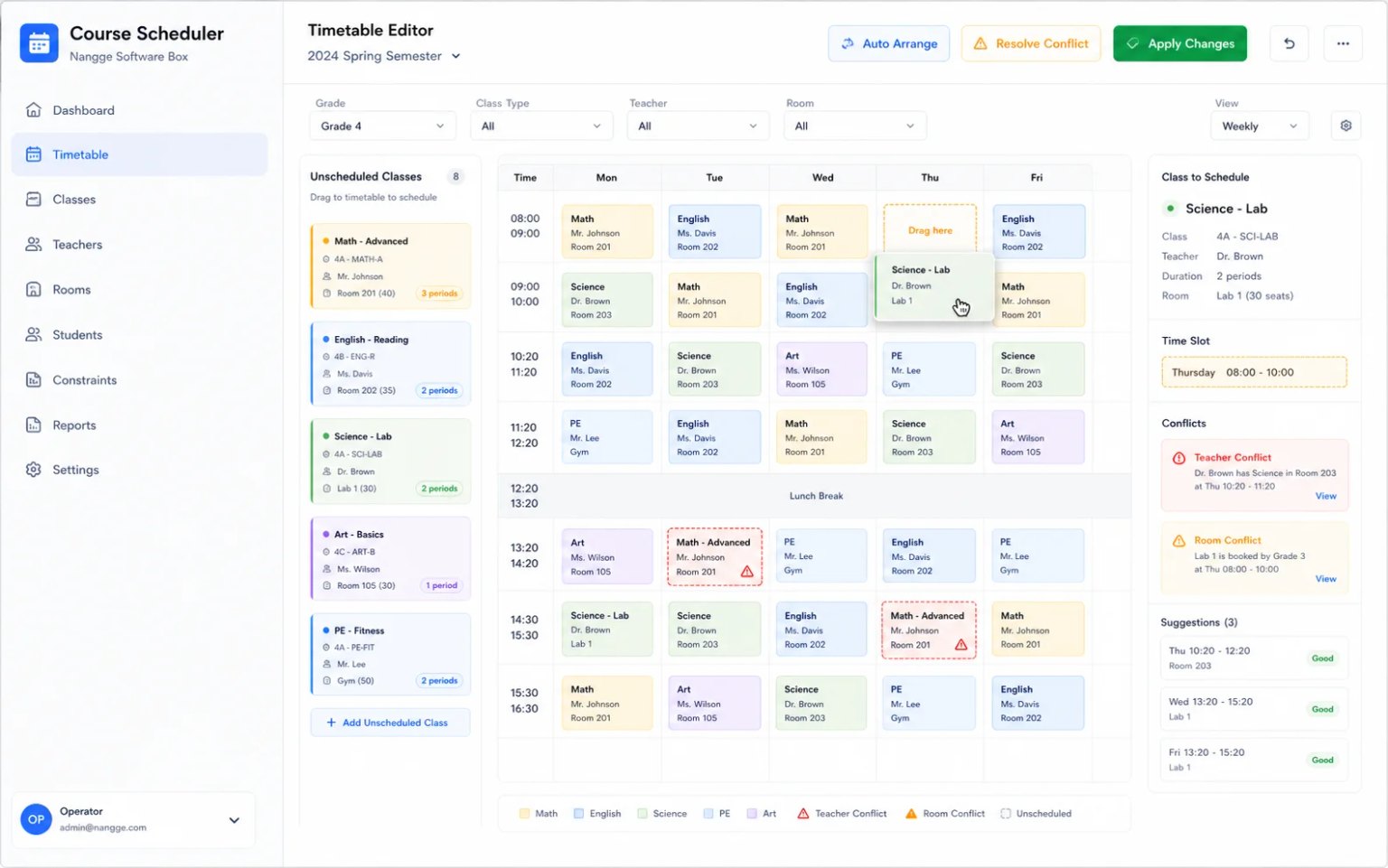
Image: building timetables for multiple school classes use case
Step 1: What should be prepared?
Collect courses, teachers, classes, rooms, available periods, and constraints that must not conflict in one place and assign a reviewer. The reviewer does not need to perform every action, but must define “done.” Depending on the product, done may mean a successful run, a usable output, or a record that another person can continue working from.
Keep the old method as a baseline during the trial. If the team currently relies on moving cells repeatedly in Excel and checking conflicts by eye, record the completion time, number of follow-up questions, and most frequent rework. Without a baseline, users often judge software only by whether it feels new.
Step 2: What is the exact workflow for building timetables for multiple school classes?
- Prepare and confirm: organize scheduling data and constraints. Resolve obvious omissions or contradictions before continuing.
- Perform the core action: build the timetable and review conflicts. Have a real future user operate it and note unclear instructions, missing permissions, or environment constraints.
- Verify the outcome: adjust for changes and publish the final schedule. Test it on real work instead of treating the absence of an error message as acceptance.
Afterward, ask someone who did not watch the process to review the output. If that person understands what happened and what to do next, the workflow has handoff value. If a long verbal explanation is still required, improve the input rules or acceptance criteria before assuming another feature is needed.
Step 3: Which mistakes should be avoided?
There are three recurring mistakes. The first is supplying vague input while expecting the product to understand private context. The second is interpreting “Reduce manual scheduling work” as permission to remove human review. The third is generating “Make timetable changes easier to review” without assigning anyone to use the result.
Do not change the rules throughout a short test. Keep the participants, scope, and acceptance standard stable; log exceptions separately. This makes it possible to distinguish a product mismatch from a process that changes faster than it can be evaluated.
Step 4: How should Course Scheduler be accepted?
Ask four questions: Was the key action completed? Can the result be found? Did missing information decrease? Did the reviewer spend less time reconstructing the outcome? If “Organize course plans faster” makes one click faster but leaves the record unclear, the operational problem remains.
For sensitive, high-risk, or professionally regulated decisions, maintain the required human review. This guide uses published product facts only and does not infer unlisted interfaces, devices, or custom processes.
How should the RMB 19.9/month trial be run?
Treat RMB 19.9/month as the cost of a controlled experiment. Pick a frequent task, measure time and rework before and after, and expand only if the improvement is visible. If nothing changes, revisit the problem definition rather than adding more software.
Confirm current access and service conditions in Nange Software Box before activation. The product page remains the source of truth for what is delivered.
Questions before and after using Course Scheduler
How large should the first building timetables for multiple school classes test be?
Choose one task with known participants, a short completion window, and a real output. Do not begin with every location, class, or team.
Can Course Scheduler work with incomplete input?
It may help reveal a gap, but incomplete data should not become final evidence. At minimum, verify courses, teachers, classes, rooms, available periods, and constraints that must not conflict.
How do we know Course Scheduler is more than convenient-looking software?
Compare follow-up questions, corrections, handoff time, and whether the final output is usable. Measured evidence is stronger than preference.
Is RMB 19.9 a one-time Course Scheduler fee?
No. The stated price is RMB 19.9/month. Check the current page for activation and included service details.
Follow the documented steps
When you are ready to run a real case, open Course Scheduler in Nange Software Box, verify the product requirements, and start with the prepared input.
Related articles
- What tool should you choose for handling frequent schedule changes in a small learning studio, and is Course Scheduler a fit?A Nange Software Box answer guide to handling frequent schedule changes in a small learning studio: what Course Scheduler is, how to use it, who it fits, and how to test it at RMB 19.9/month.
- How can you solve resolving teacher, class, and room conflicts in training centers with Course Scheduler at RMB 19.9/month?A Nange Software Box answer guide to resolving teacher, class, and room conflicts in training centers: what Course Scheduler is, how to use it, who it fits, and how to test it at RMB 19.9/month.